
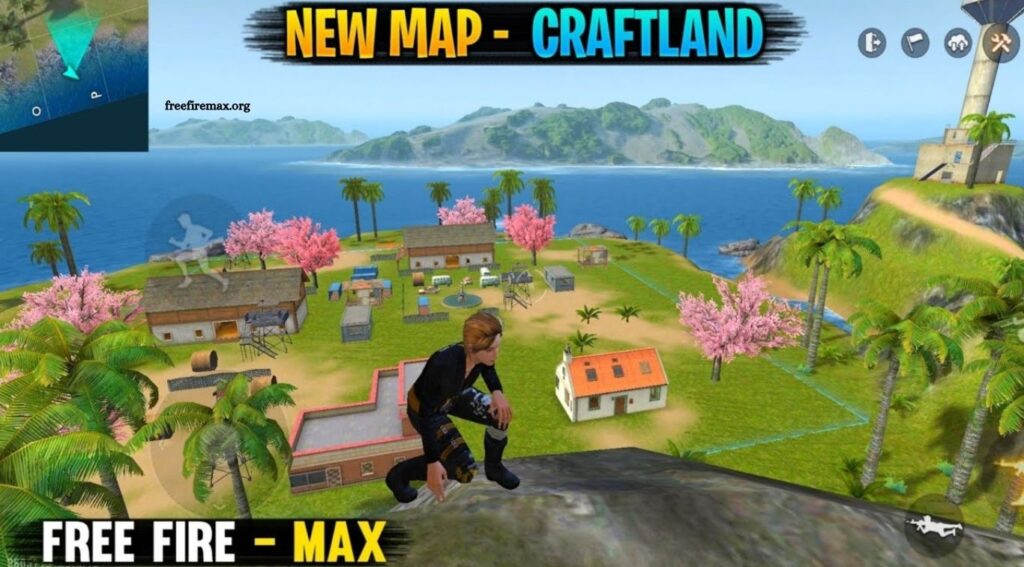
Craftland Mode brings a creative dimension to Free Fire and Free Fire MAX, giving players opportunities beyond traditional battle royale matches. Instead of relying only on standard maps and predefined game rules, Craftland focuses on custom experiences where creativity, experimentation, and community-made gameplay take center stage.
Players can explore custom maps, try unusual challenges, practice combat skills, or create personalized arenas. Different map designs and rule combinations can turn familiar Free Fire mechanics into completely new experiences. This Complete Guide to Craftland Mode covers major features, gameplay concepts, map creation basics, useful strategies, and practical tips for beginners.
Read More: Free Fire MAX Training Mode Guide
What Is Craftland Mode?
Craftland Mode is a creative gameplay feature within Free Fire that allows users to create, customize, publish, and play community-designed maps. It provides editing tools that help creators control map layouts, objects, structures, spawn locations, and selected gameplay settings.
Unlike standard Battle Royale or Clash Squad matches, Craftland maps can focus on different objectives. Creators may build close-range combat arenas, parkour courses, training grounds, racing challenges, team battles, or experimental mini-games. This flexibility makes Craftland useful for both casual players and competitive users seeking different ways to enjoy Free Fire.
How Craftland Mode Works
Craftland revolves around custom maps and personalized game rules. Players can enter existing creations or use available editing features to design their own experiences. Map creators begin with an available template or environment and customize it according to their idea. Buildings, walls, platforms, decorative objects, spawn areas, and gameplay elements can be positioned around the map.
After completing a design, creators can test their maps before sharing them. Testing helps identify problems involving movement, object placement, spawn balance, accessibility, or unfair advantages. Published creations can then become playable experiences for other community members.
Craftland Map Editor Explained
The map editor serves as Craftland Mode’s central creation tool. It provides controls for placing, moving, rotating, duplicating, and removing objects. Beginners should start with a simple map rather than attempting a highly complex project immediately. A small combat arena offers an excellent introduction because it allows creators to understand object placement, player movement, cover positions, and spawn balance.
Every object should serve a clear purpose. Random structures can make maps confusing, while thoughtful placement improves navigation and gameplay flow. Spacing also matters. Narrow sections encourage close-range fights, while large open areas favor long-range engagements. Mixing both environments can produce more varied gameplay.
Creating Your First Craftland Map
Start by deciding what type of experience you want players to have. A clear concept makes every later design decision easier. For example, a one-versus-one arena needs balanced spawn points, reliable cover, sufficient movement space, and equal opportunities for both players. A parkour map needs carefully positioned platforms, visible routes, progressive difficulty, and achievable jumps.
Build the basic layout before adding decorative elements. Focus first on movement paths, important structures, spawn areas, and objectives. Once the core gameplay works properly, add visual details that improve the environment. Test each section repeatedly. A map that looks impressive may still become frustrating when players actually move through it.
Choosing a Strong Map Layout
Map layout has a major impact on gameplay quality. Good layouts encourage movement while preventing players from gaining unfair advantages through poorly positioned structures. Balanced maps usually provide several routes between important areas. Multiple paths reduce predictable gameplay and give players tactical choices.
Cover placement requires similar attention. Too much cover may slow combat, while insufficient cover can leave players exposed. Strategic walls, buildings, boxes, and environmental objects can create natural fighting positions. Creators should also consider vertical gameplay. Elevated platforms can make maps more interesting, but excessive height advantages may hurt competitive balance.
Understanding Spawn Point Placement
Spawn locations deserve careful planning, especially on combat-focused maps. Players should generally have enough time to move, prepare, and understand their surroundings after spawning. Placing opposing teams too close together can cause immediate attacks and repetitive gameplay.
Spawn areas should also provide comparable advantages. One team should not begin beside powerful cover or a strategically superior position while another starts in an exposed area. Testing maps from every spawn location helps creators discover balance problems before publication.
Customizing Craftland Gameplay
One major attraction of Craftland Mode involves gameplay customization. Depending on available creation options and updates, creators can adjust different match elements to suit their concepts.
Custom settings can transform a basic map into a distinctive game mode. Fast-paced rounds can focus on constant action, while larger maps may reward positioning, exploration, and tactical decision-making.
Rules should support the map’s main purpose. Adding unnecessary mechanics can make gameplay difficult to understand. Simple, consistent rules often create better experiences.
Best Craftland Map Ideas
Creative concepts help maps stand apart from ordinary Free Fire matches. Close-range arenas can help players practice shotgun or SMG combat. Sniper-focused maps can feature longer sightlines and carefully positioned cover. Parkour courses can challenge movement skills through jumps, platforms, obstacles, and narrow paths.
Creators can also experiment with maze maps, racing courses, survival challenges, team-based arenas, training grounds, or themed environments. Originality matters, but playability remains more important. A simple idea with excellent execution usually provides a stronger experience than an ambitious map filled with confusing mechanics.
Craftland Mode for Combat Practice
Craftland can become a useful environment for improving Free Fire skills. Players can use custom arenas to practice movement, aiming, close-range fights, weapon switching, positioning, and quick decision-making. Repeating short custom rounds can provide focused practice without waiting through complete Battle Royale matches.
One-versus-one maps are particularly useful for practicing direct engagements. Team-based maps can help players work on coordination, communication, and positioning. Practice becomes more effective when players focus on a specific skill rather than simply trying to win every round.
Tips for Better Craftland Map Design
Successful maps usually combine visual appeal with functional gameplay. Decorative objects can establish a strong theme, but they should never interfere with player visibility or movement. Keep navigation understandable. Players should quickly recognize important routes, objectives, and combat areas.
Avoid excessive space unless long-range gameplay requires it. Likewise, avoid filling every section with structures. Players need enough room to move naturally. Performance also deserves attention. Extremely complicated environments may create a less comfortable experience on some devices. Efficient map design can improve accessibility for a wider range of players.
Test Your Map Before Publishing
Testing represents one of the most important stages of Craftland creation. Walk through every major route and inspect locations where players might become trapped. Check whether jumps are possible, entrances remain accessible, and structures behave as expected.
Combat maps require additional testing. Play from different spawn points and positions to determine whether one side consistently receives an advantage. Testing with friends can provide even better feedback because other players often discover problems creators overlook.
Common Craftland Mistakes to Avoid
New creators sometimes focus heavily on appearance while ignoring gameplay. Attractive environments cannot compensate for confusing routes, unfair spawn points, or frustrating movement. Another common problem involves overcrowding. Too many buildings, walls, decorations, and obstacles can make navigation difficult.
Poor testing can create additional issues. Players may discover unreachable areas, unintended shortcuts, camping positions, or unfair advantages after publication. Creators should treat feedback as valuable information. Improving a map after observing real gameplay can make future versions significantly better.
How to Make Craftland Maps More Enjoyable
Enjoyable maps give players clear goals and meaningful choices. A player should quickly understand where to go and what to do. Visual cues, logical layouts, and recognizable landmarks can support navigation without making maps overly simple.
Variety also improves replay value. Multiple routes, tactical positions, and different engagement opportunities can keep repeated matches interesting. Balanced challenge remains essential. Maps should test players without relying on frustrating obstacles or unavoidable disadvantages.
Craftland for Playing With Friends
Craftland offers an entertaining way to enjoy Free Fire with friends outside conventional matches. Groups can use custom maps for friendly competitions, practice sessions, mini-games, or personalized challenges. Friends can also test newly created maps and provide useful feedback about difficulty, balance, and overall enjoyment.
This social aspect gives Craftland additional value. Players are not limited to consuming existing content; they can create experiences specifically designed around their group’s preferred gameplay style.
Improving Your Craftland Skills
Better Craftland creation comes through experimentation. Study successful map layouts and observe how different designs guide player movement. Pay attention to combat flow. Notice where players naturally gather, where fights become repetitive, and which areas remain unused.
Small improvements can have a major impact. Moving a wall, changing a spawn position, opening another route, or removing an unnecessary object may completely change how a map plays. Continued testing, feedback, and redesign help creators develop stronger map-building skills over time.
Is Craftland Mode Good for Beginners?
Craftland can be suitable for beginners because players can explore different experiences without needing to master map creation immediately.
New users can begin by playing community-created maps. This helps them understand how custom rules, layouts, and objectives work.
Once comfortable, beginners can experiment with simple creations. Starting with a small project makes the editing process easier to understand and reduces unnecessary complexity.
Why Craftland Mode Stands Out
Craftland expands Free Fire beyond standard competitive formats by putting more creative control into players’ hands. Traditional modes follow established maps and objectives. Craftland allows community creators to experiment with different layouts, challenges, and gameplay concepts.
That combination of creation, practice, competition, and social play gives Craftland a distinctive role within the Free Fire experience. Players looking for something different from regular Battle Royale or Clash Squad matches can find considerable variety through custom creations.
Frequently Asked Questions
What is Craftland Mode?
Craftland Mode lets Free Fire players create, customize, share, and play unique community-designed maps and game experiences.
Can beginners play Craftland Mode?
Yes. Beginners can explore custom maps, practice gameplay skills, and gradually learn map creation tools.
Can I create my own map in Craftland?
Yes. Craftland provides editing tools for designing maps, placing objects, setting spawn points, and customizing gameplay.
Is Craftland useful for practice?
Yes. Custom maps can help players practice aiming, movement, close-range combat, positioning, and teamwork.
Can I play Craftland maps with friends?
Yes. Players can enjoy custom challenges, practice matches, mini-games, and competitive battles with friends.
What makes a good Craftland map?
Balanced spawn points, clear routes, useful cover, smooth movement, fair gameplay, and regular testing create a strong Craftland map.
Conclusion
Craftland Mode provides Free Fire players with a flexible space for creativity, practice, competition, and community-driven gameplay. Players can explore custom maps, build personalized arenas, create unique challenges, and experiment with gameplay ideas that differ from standard modes. Successful Craftland maps depend on more than attractive designs. Balanced spawn locations, smooth navigation, thoughtful object placement, clear objectives, effective testing, and fair gameplay all contribute to a better player experience.

Pingback: Best Vehicle Tips for Faster Rotation - Free Fire Max