
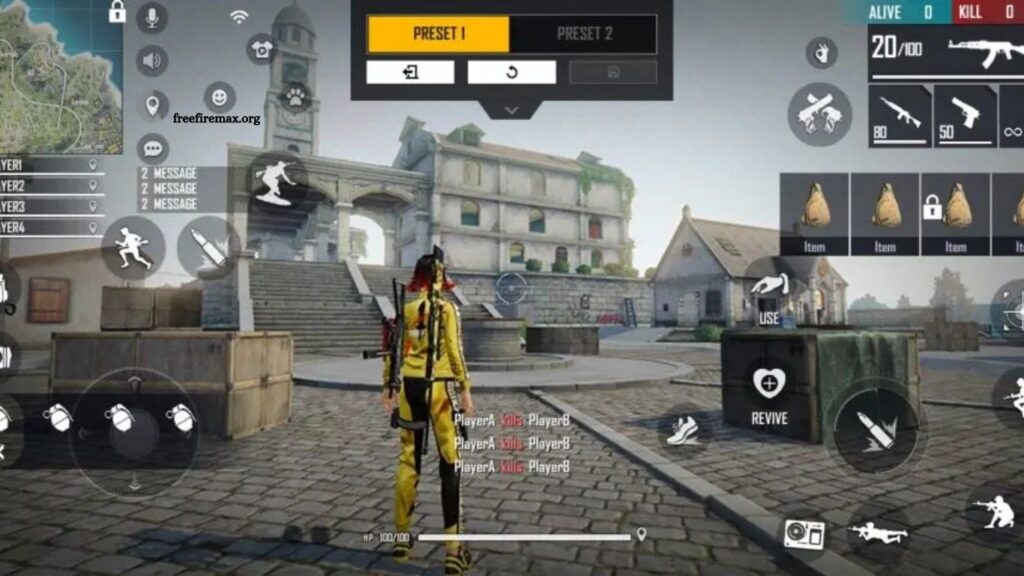
Starting Free Fire MAX can feel challenging when enemies move quickly and every second matters. New players often struggle with aiming, movement, shooting, and switching weapons because the default control layout may not match their playing style. A few smart control changes can make gameplay more comfortable and responsive.
The right Free Fire MAX control settings help beginners build better muscle memory and improve accuracy. Instead of copying advanced player layouts immediately, beginners should start with a simple setup that keeps essential buttons easy to reach. This guide explains useful control settings and practical ways to adjust them for smoother gameplay.
Read More: How to Recover Your Free Fire MAX Account
Why Control Settings Matter in Free Fire MAX
Control settings affect almost every action during a match. Movement, aiming, firing, crouching, jumping, switching weapons, and using items all depend on button placement and sensitivity.
A comfortable layout reduces unnecessary finger movement. It also allows players to react faster during close-range fights. Beginners should focus on consistency rather than constantly changing settings after every match.
Best Free Fire MAX Control Layout for Beginners
A simple two-finger layout works well for players who are still learning the game. Keep the movement joystick on the lower-left side and place the main fire button on the lower-right side.
The jump, crouch, prone, reload, and weapon-switch buttons should remain close enough to reach without covering important areas of the screen. Avoid placing too many buttons around the center because they can block visibility during fights.
The fire button should have a comfortable size. A button that is too small can cause missed taps, while an oversized button may interfere with aiming.
Recommended Button Placement
The movement joystick should stay in its default lower-left position. This area gives the left thumb enough room to control character movement.
Place the main fire button on the lower-right side where the right thumb can reach it naturally. Keep the crouch and jump buttons nearby so you can combine movement actions quickly.
The weapon-switch button should remain accessible without forcing the thumb away from the main controls. Place healing and utility buttons slightly farther away because they are generally used less frequently during combat.
Adjust the Fire Button Size
The fire button plays a major role in Free Fire MAX combat. Beginners should experiment with its size instead of using an extremely small or extremely large button. A medium-to-large fire button can make shooting easier for new players.
It also provides more space for drag movements when practicing headshots. Start with a comfortable size and test it in Training Mode. Increase or decrease the button until tapping and dragging feel natural.
Use a Simple HUD
A crowded HUD can make Free Fire MAX difficult to control. Beginners should avoid adding unnecessary controls or moving every button immediately.
Keep the most important controls visible and organized. Movement, firing, jumping, crouching, weapon switching, and healing should have clear positions.
A clean HUD also helps reduce accidental touches. Once you become comfortable with the basic layout, you can gradually introduce a more advanced setup.
Recommended Control Settings for Two-Finger Players
Two-finger controls are a good starting point for beginners. The left thumb handles movement while the right thumb manages aiming, shooting, and other actions.
This setup is easy to learn and does not require complicated finger coordination. Players can gradually improve their reaction speed through regular practice.
After developing better muscle memory, some players may prefer three-finger or four-finger controls. These layouts can provide faster access to multiple actions, but they require more practice.
Free Fire MAX Aim and Control Tips
Control settings work best when combined with consistent practice. Beginners should spend time in Training Mode before entering competitive matches.
Practice moving while shooting, switching weapons, crouching during fights, and using the jump button without losing control of the character. These simple exercises can improve coordination.
Avoid changing your HUD every day. Frequent changes prevent your fingers from developing consistent muscle memory. Give a new layout enough time before deciding whether it works.
Control Settings for Close-Range Combat
Close-range battles require fast movement and quick shooting. Keep the fire, crouch, and jump buttons within easy reach.
A comfortable fire button can make drag shots easier. Crouching can also help during close combat by changing your movement pattern and making your character harder to track.
Practice these movements with different weapons in Training Mode. Shotguns and SMGs are particularly useful for learning close-range control.
Control Settings for Long-Range Combat
Long-range fights require more precise aiming. Avoid placing large buttons over the center of the screen because they can obstruct your view.
Keep the scope button easy to access while maintaining enough screen space for tracking opponents. A clean HUD makes it easier to follow moving targets.
Beginners should also avoid making drastic sensitivity changes at the same time as HUD changes. Adjust one setting at a time so you can understand its effect.
How to Customize Free Fire MAX Controls
Open Free Fire MAX and enter the settings menu. Find the Controls or Custom HUD section, depending on the current game interface. From there, move buttons to positions that feel comfortable.
Resize important controls and adjust their transparency if the game provides those options. Enter Training Mode after saving the layout and test every important action.
Spend several matches using the same configuration. If a particular button causes accidental touches or feels difficult to reach, make a small adjustment rather than completely redesigning the HUD.
Common Control Mistakes Beginners Should Avoid
One common mistake is copying a professional player’s HUD without considering screen size or personal comfort. A layout that works for an experienced player may feel uncomfortable for someone new to the game.
Another mistake is constantly changing controls after losing a match. Poor positioning, aim, game awareness, and decision-making can contribute to a loss, so changing the HUD will not always solve the problem.
Beginners should also avoid placing buttons too close together. Overlapping controls can cause accidental actions during intense fights.
Build Muscle Memory Through Practice
Good control settings become useful when your fingers remember button positions automatically. Muscle memory develops through repetition.
Use Training Mode to practice the same actions repeatedly. Move, aim, fire, reload, switch weapons, crouch, and jump using the same button positions.
With consistent practice, you will spend less time thinking about controls and more time focusing on enemies, positioning, and strategy.
Frequently Asked Questions
What are the best Free Fire MAX controls for beginners?
A simple two-finger layout with an accessible fire button is ideal for beginners.
What size should the fire button be?
A medium-to-large fire button usually feels comfortable and makes shooting easier.
Should beginners use a custom HUD?
Yes. A customized HUD can make important controls easier to reach and use.
Are two-finger controls good for Free Fire MAX?
Yes. Two-finger controls are simple to learn and suitable for beginners.
How often should I change my control settings?
Avoid frequent changes. Practice one layout long enough to develop muscle memory.
Where can beginners practice their controls?
Training Mode is the best place to practice movement, aiming, shooting, and button combinations.
Conclusion
Finding the right Free Fire MAX control settings for beginners can make gameplay smoother, more comfortable, and easier to control. A simple HUD, well-positioned fire button, accessible movement controls, and consistent practice provide a strong foundation for improving aim and reaction speed. Beginners should focus on comfort rather than copying professional layouts. With regular practice and small adjustments, players can develop better muscle memory and gain confidence in every match.

Pingback: Best Sniper Tips for Long-Range Battles - Free Fire Max